

The Short Version
AI made building cheap. Starting around November 2025 w/Opus 4.5:
The things that used to take a developer two weeks started taking an afternoon.
And the thing that took an afternoon started taking ten minutes.
Building was cheap, but managing all the output got expensive (at least without a plan).
Many AI users are sitting on piles of prompts they wrote once, can’t find, and never ran again. No habit formed. No system built.
The AI “prompt libraries” were supposed to be a part of a well-oiled machine, but they now look like an episode of Hoarders.
Hundreds of work-in-progress prompts all stuck in purgatory. This is a travesty, because the fix is a little more time in the right places. We need to follow the patterns and playbooks by those who have already solved this.
Kieran Klaassen at Every wanted a codebase that got better with every feature shipped. I want the same thing for workflows: every lap around the loop should make the next workflow cheaper, easier, and better.
This post describes these loops. One version for a soloist, one for a team, and the honest reason most of the effort occurs before and after the build steps.
The Inspiration
Orie Steele put together a deck he calls vibeslop. It’s an entire software development lifecycle for the AI era: Pitch, Sketch, spec-kit, Ship, Score, with the named frameworks at every stage (e.g., Jobs to Be Done, the Hook Model, Double Diamond, etc.).
It’s serious work, and I mean that as a compliment for an article title, as a joke. It’s also built for engineers, not the rest of the organization.
I wanted the version that fits on a whiteboard and works for someone who has never opened a repo, because it’s the work I do day in and day out with my clients.
Why Me
I’m an engineer and repeat startup founder who became an executive, so I live on both sides of this loop. I wrote about that split as the Forward Deployed Executive, so I won’t re-explain it here.
What I’m about to share is a combination of solutions I’ve applied across a dozen clients across as many industries. I’ve already published articles on various facets of this, but I wanted to bring it all together into one Sesame Street Simple map.
And while there are already multiple takes on AI-native software development lifecycles (SDLC), the reality is that there hasn’t been as much focus and success in mapping this out for the non-engineering portions of an organization (which can represent a large majority). Also, AI is still evolving rapidly, so best practices will likely continue to evolve across all types of organizations.
My bet: learning to run a loop like this is the skill that survives the next model release.
The Value
Here’s what you get for running a loop instead of a one-off. Four things, and each one depends on the one before it.
Quality. You stop one-shotting. The second and third passes are where the good stuff shows up, because follow-through is the actual superpower.
Consistency. One-off, then prompt, then skill, then automation. Every step down that ladder narrows the variance in what comes out.
Automation. You can’t automate what you don’t trust (hence the need to master quality and consistency first).
Compounding. Time saved and improved outcomes free up resources to go around again. That’s the whole game.
Again, builds are cheap. Given that, expect to spend 90-95% of your time into the workflow design and the structure around the build. That’s the part that pays back on every future lap.
The One-Off Strategy
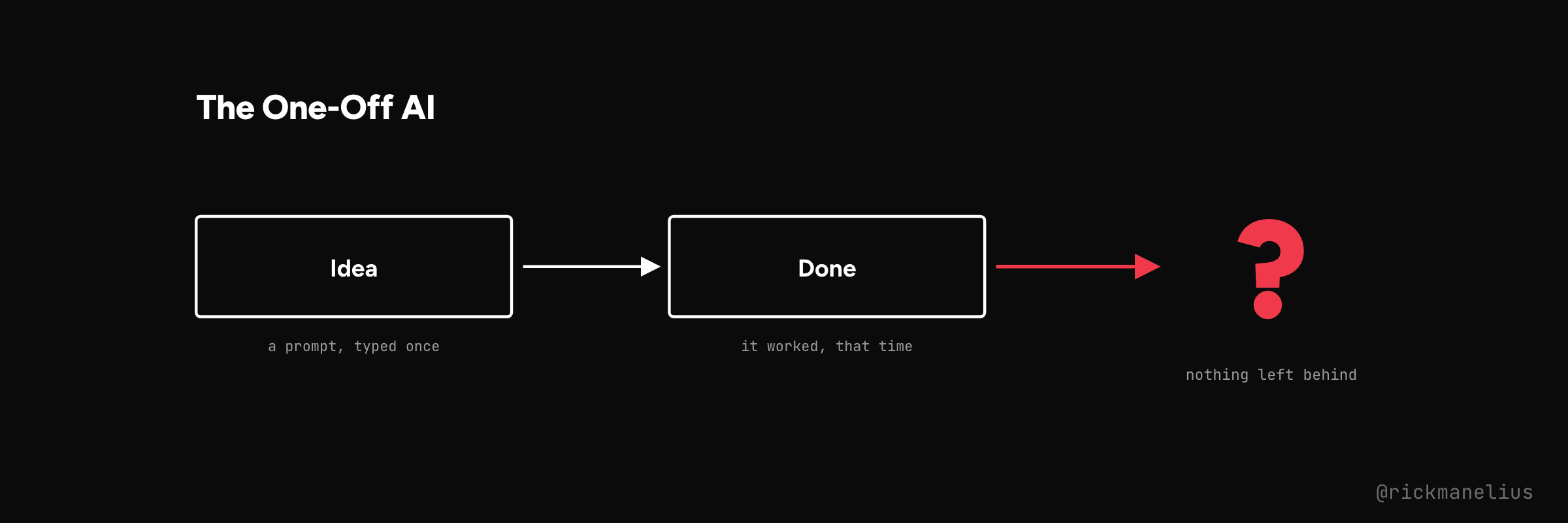
You know this one. Someone had an idea, typed it into a chat window, and it worked. The demo impressed everyone at the meeting.
Then nobody ran it again.
The prompt lives in a Slack thread, or a Notes file, or in the head of the one person who wrote it. Next time the job comes up, it starts from zero.
The paradox is that it’s the packaging and automation where the real, long-term value comes from in any of this work… and most people stop 10 yards from the finish line.
The Solo Loop
Five stages for each lap around the loop.
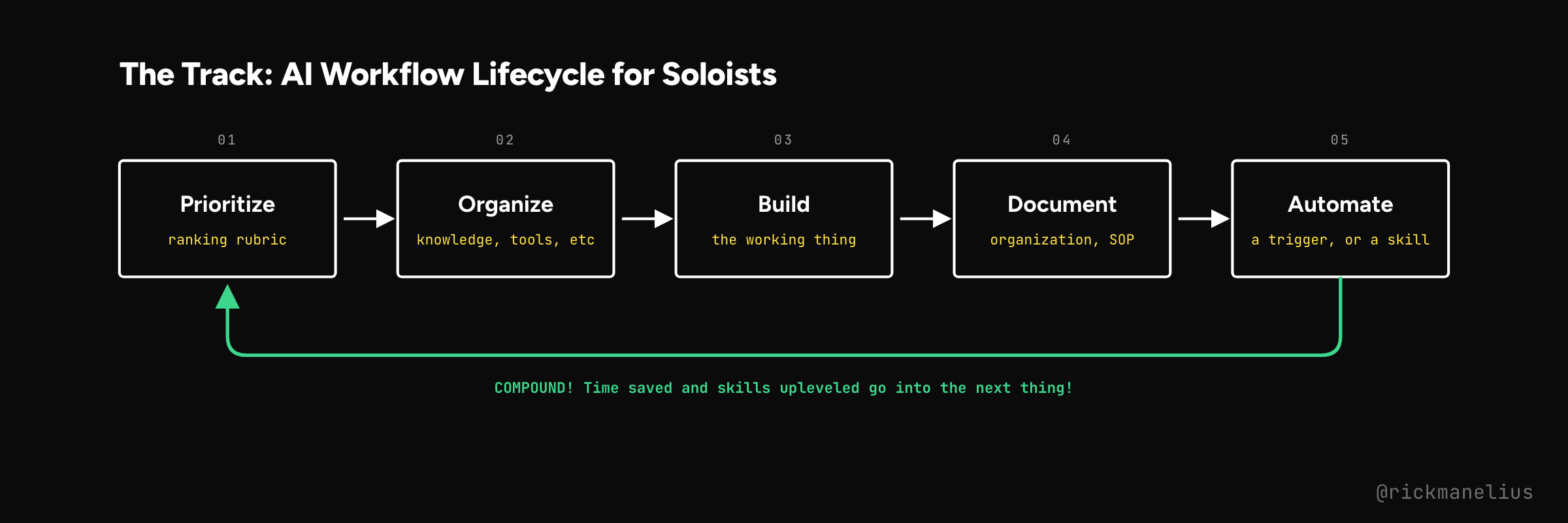
Prioritize. Rank what’s worth doing against a rubric (I score Value, Effort, Reach, and Recurring). Ignore the rest.
Organize. Gather what the job needs before you open a tool: the knowledge, context, APIs, and systems it touches.
Build. Proof of concept first. Once it’s approved, polish it into the version someone will actually use this week.
Document. Write down what good looks like, in cases you trust, plus the SOP for running it. Plan for organization and recall. Your future self will thank you.
Automate. The goal: you can one-click trigger an entire process: bonus, the work fires on a schedule or a trigger.
The loop closes at the bottom, and that’s the part I care about. Time saved and skills upleveled go straight into the next thing on the ranked list. You never start from zero twice.
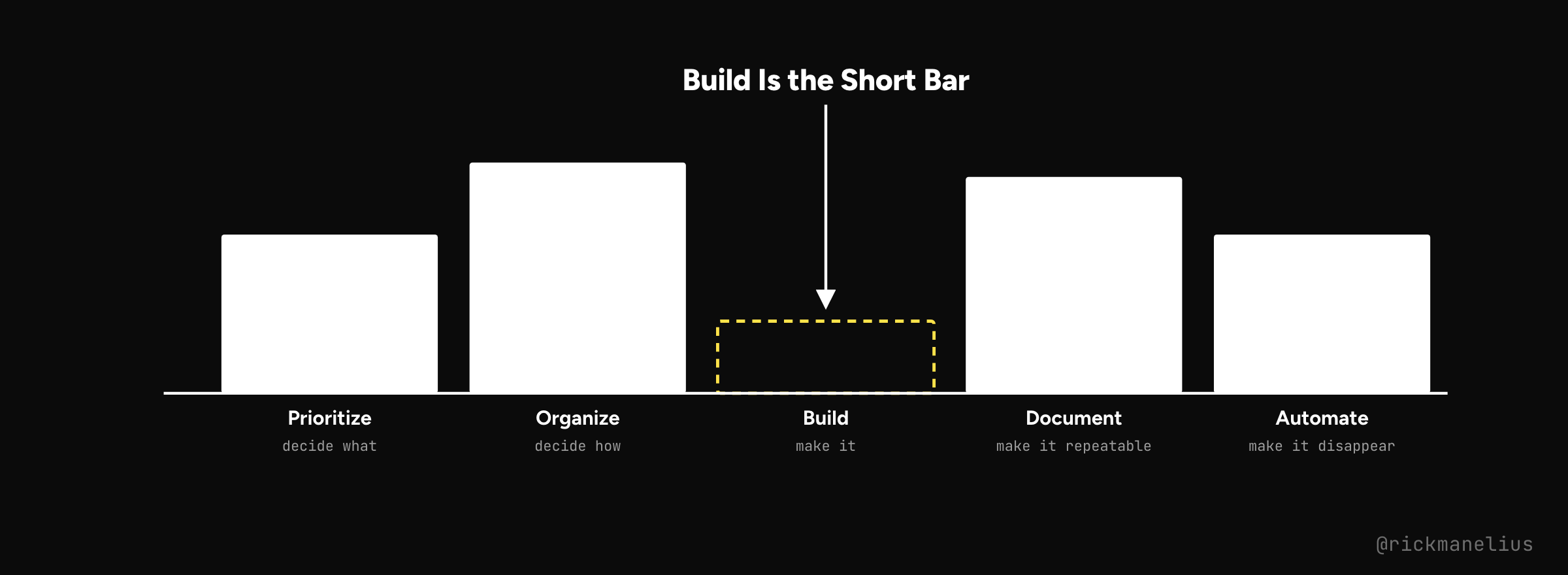
Expectation control: this is where the hours go. Build is the short bar. Organize and Document are the tall ones because planning the job and writing down what good looks like make up most of the work. Skip those two to “just build it” and you get a one-off with extra steps.
The dopamine trap of moving fast and furious ends with no long-term durable workflow improvements. Resist it. Finish the loop!
The Team Loop
You’ve heard the proverb: if you want to go fast, go alone. If you want to go far, go together.
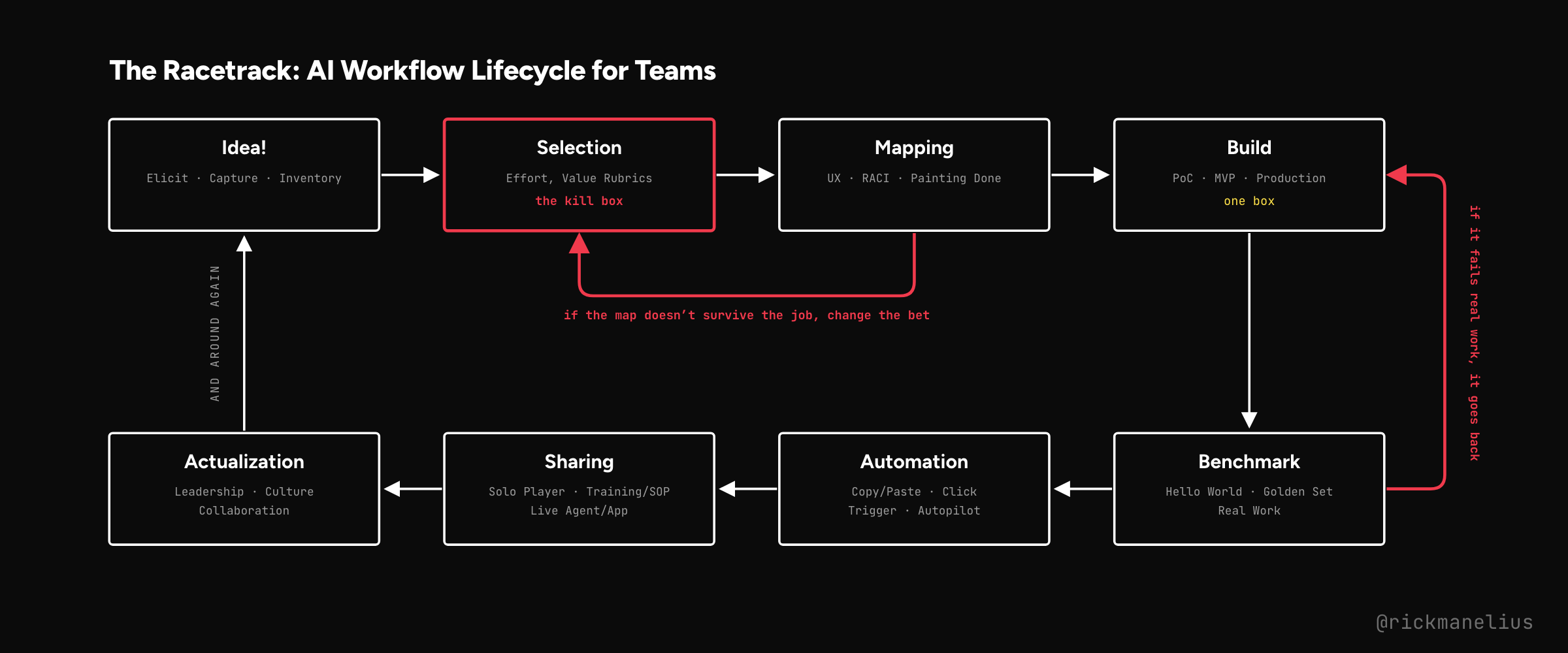
There’s a big difference when you go from solo mode to teams. Now you gotta prioritize the right things, ensure proper change management and training, etc. If you don’t, your amazing workflows stay on an island with you instead of leveraging the entire team or organization. Resist the temptation to skip this!
You can slice and dice this further, but I like to think of this as 8 steps:
Idea! Get the ideas out of people’s heads, write them down, and keep a shared list you can draw from as needed.
Selection. Rank the list using an effort-and-value rubric, and name the outcome before anyone opens a tool. This is the kill box.
Mapping. Sketch the UX, who’s responsible for what (RACI), and paint what done looks like. If you uncover many problems, update the priority scores and send it back.
Build. PoC, then MVP, then production. Don’t skip the ugly middle.
Benchmark. Does it work beyond a “Hello World” demo? Test against the end-users’ golden set until it’s delivering value.
Automation. Reduce as much friction as possible to make remembering, finding, and triggering easier again and again.
Sharing. Ensure everyone knows where to look and how to use it, and that they can successfully achieve the outcome.
Actualization. Leadership, culture, collaboration. This is where feedback and new ideas come from, and then you go around again.
Two arrows point backward, and they will save you tons of headaches if you stay disciplined and use them.
Mapping sends work back to Selection when the map doesn’t survive contact with the real job.
Benchmark sends work back to Build when the real work fails.
Past Benchmark, nothing comes back. That’s on purpose. Benchmark sits between Build and Automation, so passing it is what earns a trigger. Every other framework I looked at puts evals inside Build (to gate the merge) or after ship (to measure the outcome). This one puts them in front of autopilot. You don’t get to automate something that can’t pass real work.
Ideally, you keep forward momentum wherever possible. And of course, don’t be too rigid. This set of constraints is meant to help you achieve full actualization of your efforts! Not to straitjacket you into sitting still. But lots of frenetic motion without a plan can be even worse. Find the balance point in your organization and apply the parts that work for you.
The Future Phase
I want to go much deeper on this, but only if this topic resonates with enough people. No matter what, I plan on using it in my AI consulting practice for the foreseeable future.
The longer follow-up would include:
The frameworks at each stage (the way Orie did it in his article)
Skill files per step so an agent can run the loop with you.
If this post gets at least 10 comments from people saying they’d be interested, I’ll proceed.
Follow-up
Give this to your agent and have it draft your own version of the loop. Then argue with it (and make it yours).
Subscribe to my newsletter so you get a notification.
Skills are coming, one per step. Some are already on github.com/rickmanelius/skills.
Share it if it helped. If this gets 10 comments, I’ll know it matters enough to build the long one.
Comment “follow-up” and I’ll DM you when the long version is published.
PS. Here’s a HyperFrames explainer for those that prefer another angle at this.